
Guide d'Installation
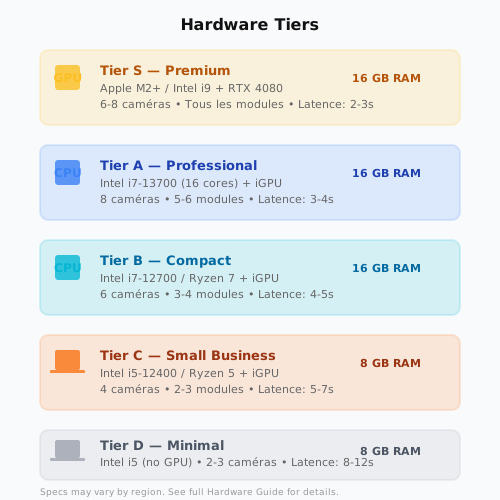
Prérequis Hardware
| Tier | CPU | Caméras | Profils | RAM | Disque |
|---|---|---|---|---|---|
| S | Apple M2+, NVIDIA RTX 3060 | 6-8 | Tous | 8 GB | 256 GB |
| A | Intel i7-13700 (16C) | 8 | Tous | 16 GB | 512 GB |
| B | Intel i7-12700, Ryzen 7 | 6 | Tous | 16 GB | 256 GB |
| C | Intel i5-12400, Ryzen 5 | 4 | Simples | 8 GB | 256 GB |
| D | Intel i5 (sans iGPU) | 2-3 | Basiques | 8 GB | 128 GB |
Prérequis Logiciel
- OS — Ubuntu 22.04 LTS ou supérieur (ou compatible Linux)
- Docker — 24.0 ou supérieur
- Docker Compose — 2.20 ou supérieur
- Ollama — Version 0.1+ (télécharger sur ollama.ai)
- GPU (optionnel) — CUDA 12.0+ pour accélération
Installation Docker
1. Cloner le Dépôt
bash
git clone https://github.com/gtognisso/cctv-smart.git
cd cctv-smart
2. Copier la Configuration Example
bash
cp config/example.yaml config/cctv_smart.yaml3. Démarrer les Services
bash
docker compose up -d4. Télécharger le Modèle Gemma
bash
docker exec ollama ollama pull gemma4:e4b5. Vérifier la Santé du Système
bash
curl http://localhost:8000/healthRéponse attendue :
json
{"status": "healthy", "components": {"api": "ok", "redis": "ok", "ollama": "ok", "database": "ok"}}Formats RTSP par Marque
Remplacer <IP>, <USER>, <PASS> selon votre configuration.
Hikvision
rtsp://<USER>:<PASS>@<IP>:554/Streaming/Channels/101
rtsp://<USER>:<PASS>@<IP>:554/Streaming/Channels/102
Dahua
rtsp://<USER>:<PASS>@<IP>:554/cam/realmonitor?channel=0&subtype=0
rtsp://<USER>:<PASS>@<IP>:554/cam/realmonitor?channel=1&subtype=0
Uniview
rtsp://<USER>:<PASS>@<IP>:554/unistream/0
rtsp://<USER>:<PASS>@<IP>:554/unistream/1
Reolink
rtsp://<USER>:<PASS>@<IP>:554/h264Preview_01_main
rtsp://<USER>:<PASS>@<IP>:554/h264Preview_02_main
Configuration Telegram
1. Créer un Bot Telegram
- Ouvrir @BotFather sur Telegram
- Envoyer
/newbot - Suivre les instructions → obtenir le Token API
2. Obtenir le Chat ID
- Ajouter le bot à un groupe ou chat privé
- Envoyer un message au bot
- Récupérer le Chat ID :
bash
curl "https://api.telegram.org/bot<TOKEN>/getUpdates" | grep chat_id3. Configurer dans YAML
yaml
alerts:
  telegram:
    enabled: true
    token: "<TOKEN>"
    chat_id: <CHAT_ID>
    send_photo: true
Accès Web
- API — http://localhost:8000
- Documentation Interactive — http://localhost:8000/docs
- Santé Système — http://localhost:8000/health